 FLASHLOOK.AI
Introducing Collection Autopilot: shoot your whole drop in one run
Upload your collection photos and Autopilot finds the products and colorways, styles every look, casts your models and shoots a full product page - two products at a time.
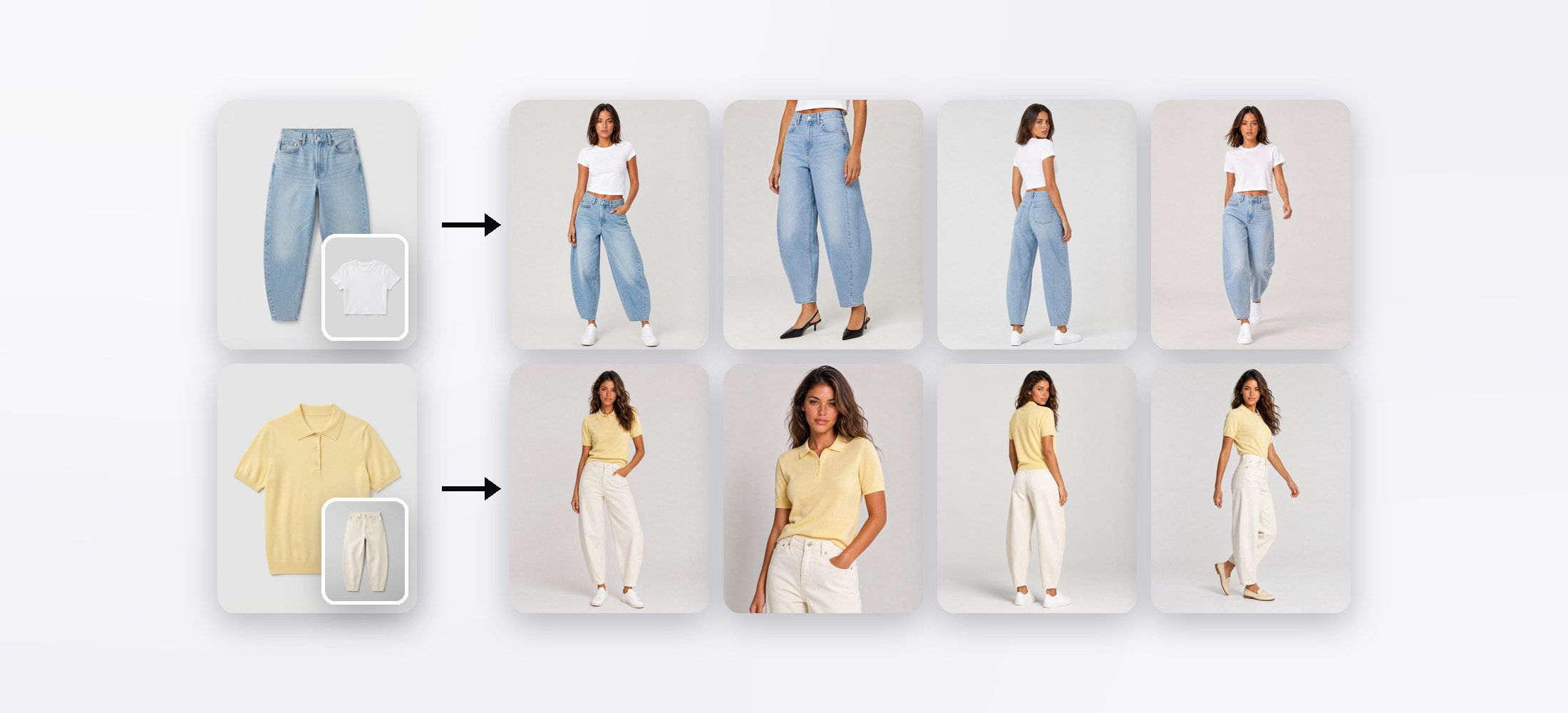
Shooting one product is easy. Shooting a whole drop is where the hours go: sorting photos into products, figuring out what each piece should be worn with, picking models, and firing shoot after shoot while keeping it all consistent.
Collection Autopilot does all of that in one run. Upload your collection photos - hangers, flat lays, phone shots - and Autopilot turns them into a full, consistent product page for every piece.
Seven steps, one run
Every step is reviewable and editable - or just press Next and let Autopilot decide.
Products and colorways, found for you
Autopilot reads every photo, groups the ones that show the same item into a product, and links colorways of the same garment. Each colorway stays its own product, but they're shot as a set, on the same model. Got a grouping wrong? Drag a photo to another product and you're done.
Every look completed
A pair of jeans on its own isn't a product photo - it needs a top. Autopilot's stylist completes every look with one matching piece, and it always tries to sell you something first:
When nothing in your catalog fits, it reaches into the flat-lay bank: hundreds of neutral basics in women's and men's, shot as clean flat lays and filterable by category and color. You can drag any of them onto a look yourself, swap, clear - or hit Random for a fresh idea.
A full product page per piece
Pick the models Autopilot may cast from, and one preset for the whole drop. Studio Product Page - the default - shoots the complete set for every item: full front, product card, back, detail and an editorial frame, plus a waist-down crop for bottoms.
Prefer a different mood? Start from any of our public presets - or one of your own.
Review, then run
The review screen shows the whole run on one page - every product with its look, model and frames, and the exact credit cost next to your balance. Nothing is charged until you press Start collection.
Autopilot then shoots two products at a time, every frame of a product at once, and you watch each image land. Pause, resume or retry any frame - and running the collection again adds a fresh set of images instead of replacing the first.
Why it's different
Try it
Collection Autopilot is live in the Atelier - look for Autopilot (the rocket) in the top bar. Start with a few photos to see how it styles your pieces, then run the whole drop.
FAQ
How many photos can I upload to one collection?
Up to 150 photos per collection. Autopilot groups them into products and colorways for you.
Do my product photos need to be professional?
No. Photos on a hanger, flat lays or phone shots all work - Autopilot reads the garment, not the photo setup.
How much does a collection cost?
It depends on the number of products, frames and the image model in your preset. The review step shows the exact credit total before anything is charged.
What happens if I run a collection twice?
The new run adds a fresh set of images next to the first one. Nothing is overwritten.
Consistent AI fashion models for catalog and UGC. Open Studio · Browse AI Fashion models